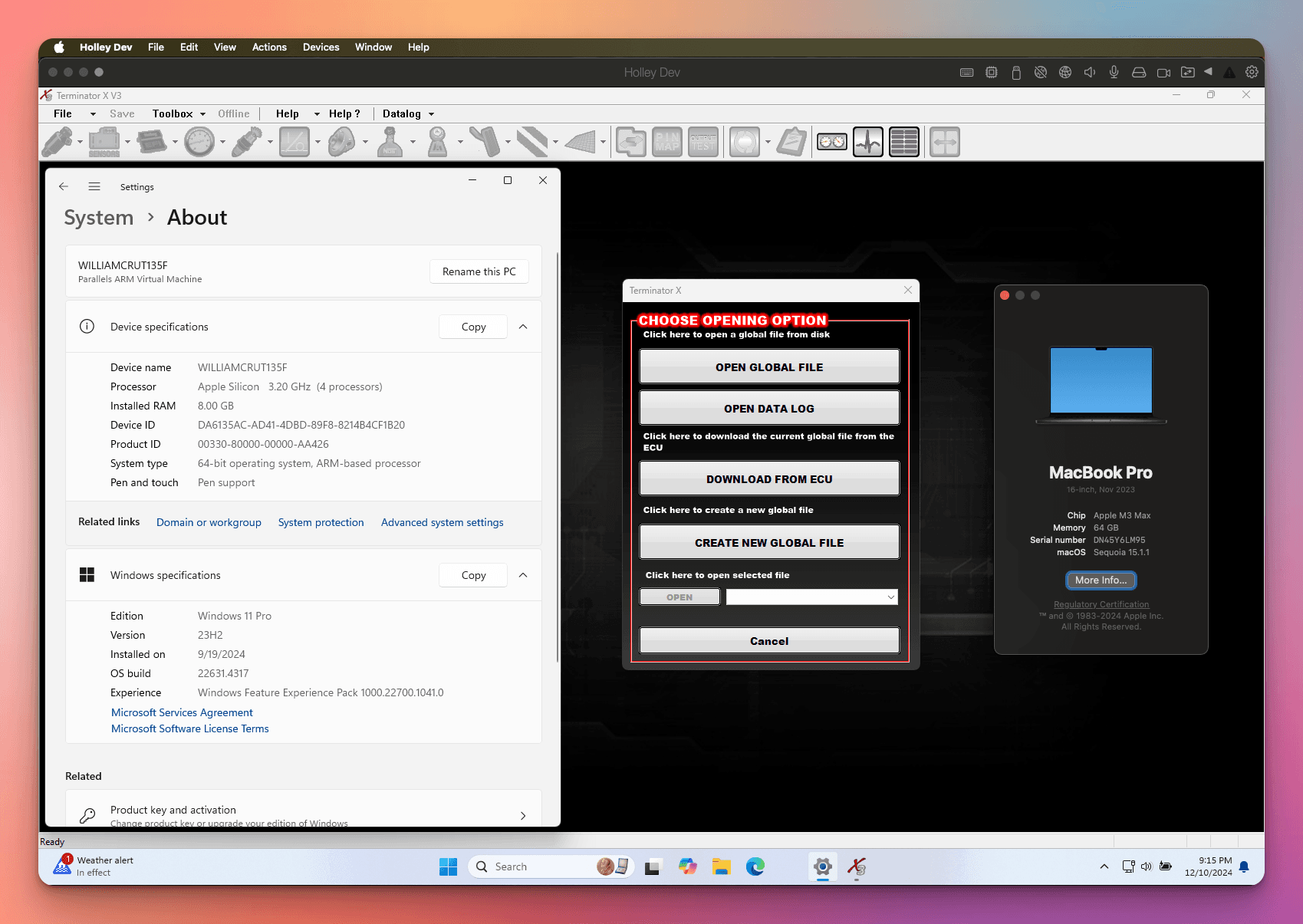
Run Holley Terminator X on your MacBook Air M4 in 60 seconds.
Tired of hauling an old Intel laptop to the garage? iCANDrivers lets you run Holley Terminator X on your MacBook Air M4 through Parallels, VMware, or UTM. Our custom driver handles CAN bus communication so you can tune from your daily driver—not a dusty backup machine.
“Thank you for your help! I appreciate what you've done for us Mac users!”
— Isaiah F.
“IT WORKED!!! Thanks a million!”
— Bob P.
“It worked. Thank you!!”
— Mike
“Thank you for your help! I appreciate what you've done for us Mac users!”
— Isaiah F.
“IT WORKED!!! Thanks a million!”
— Bob P.
“It worked. Thank you!!”
— Mike
Does Terminator X work on MacBook Air M4?
Yes. iCANDrivers is built for Holley Terminator X on MacBook Air M4. Install once, run in about 60 seconds, and tune without using an old Intel laptop.
Why Tuners Choose iCANDrivers
Download. Install. Tune. That's it.
Buy Once, Use Forever
No subscriptions. No renewals. One purchase gives you lifetime access with free updates included.
Native ARM Support
Optimized for M4. Run Terminator X through Parallels, VMware Fusion, or UTM seamlessly.
One Laptop Setup
Stop carrying that old Intel laptop to the garage. Your daily driver now handles everything.
Quick Setup Guide
Get Terminator X running on your MacBook Air M4 in minutes.
The MacBook Air M4 (2025) with M4 chip is fully compatible with iCANDrivers. For optimal performance with Holley Terminator X, we recommend using Parallels Desktop for the best USB passthrough experience. VMware Fusion and UTM are also supported alternatives.
Install Windows 11 ARM in Parallels, VMware Fusion, or UTM on your MacBook Air M4
Download Holley Terminator X from Holley's official website
Purchase and download the iCANDrivers installer
Run the iCANDrivers installer inside your Windows VM
Connect your Holley hardware via USB passthrough
Launch Terminator X and start tuning
Terminator X Features
- LS/LT engine support
- Drive-by-wire throttle control
- Variable cam timing control
- Transmission control
- Traction control
MacBook Air M4 Specs
- ProcessorM4
- ManufacturerApple
- PlatformmacOS + Windows VM
- Year2025
Choose Your License
One-time purchase. Lifetime access. No subscriptions.
Personal
One-time payment · For one laptop
- 1 device activation
- Lifetime updates
- Email support
Instant email delivery · 30-day money-back guarantee
Pro
Best ValueOne-time payment · Covers your laptop, desktop & spare
- 3 device activations
- Lifetime updates
- Priority support
Instant email delivery · 30-day money-back guarantee
Shop
One-time payment · For shops & pro tuners
- Unlimited activations
- Every machine in your shop
- Lifetime updates
- Priority support
- Commercial use license
Pays for itself on the first customer job
“Thank you for your help! I appreciate what you've done for us Mac users!”
— Isaiah F.
“IT WORKED!!! Thanks a million!”
— Bob P.
“It worked. Thank you!!”
— Mike
Don't have a MacBook Air M4?
We support Windows ARM devices too. Same driver, same easy setup.
View Windows ARM Drivers→See It In Action
Watch a real demo of the driver installation and Terminator X running on ARM.
Frequently Asked Questions
Is this Terminator X driver official from Holley?
No, this is a custom third-party driver designed specifically to enable Holley Terminator X to run on MacBook Air M4 devices. Holley's official drivers do not support ARM-based processors, which is why iCANDrivers exists.
Will this driver work with my MacBook Air M4?
Yes! The iCANDrivers Terminator X driver is fully compatible with MacBook Air M4 running Windows 11 via Parallels, VMware Fusion, or UTM. Our driver bridges the compatibility gap between Holley Terminator X and ARM processors.
How do I install Holley Terminator X on my MacBook Air M4?
After purchasing, you'll receive an instant email with download instructions. Install Windows 11 ARM in your virtual machine, then run the iCANDrivers installer, and you'll be tuning within 60 seconds.
Can I use the driver on multiple machines?
Each license is valid for a single machine or virtual machine instance. If you have multiple Macs, you'll need separate licenses for each.
What if the driver doesn't work?
We offer a 100% money-back guarantee within 30 days. If you encounter any issues, contact support@icandrivers.com and we'll either resolve the problem or provide a full refund.
Do I need special software to run Terminator X on MacBook Air M4?
Yes, you'll need virtualization software like Parallels, VMware Fusion, or UTM to run Windows 11 ARM on your Mac. Our driver then enables Holley Terminator X to communicate with your Holley hardware through the virtual machine.
What Holley hardware is compatible with this Terminator X driver?
This driver supports all Holley Terminator X compatible hardware including 24x LS engines, 58x LS engines, Gen V LT engines, 4L60E transmission, 4L80E transmission, Holley 558-443 CAN to USB cable. The driver enables CAN bus communication between your MacBook Air M4 and the ECU via the Holley USB-to-CAN adapter.
Is the driver optimized for Apple Silicon M4?
Yes! Our driver is specifically optimized for Apple Silicon Macs with M4 processors. We've tested extensively on MacBook Air M4 to ensure reliable CAN bus communication and USB device passthrough.
Meet the Creator
Learn the story behind iCANDrivers and how it all started.